RunningVersion 1.22.1 is out

Your clusters,
at a glance.

Lumovi is a calm, fast Kubernetes dashboard, on your desktop or in your cluster. It shows what’s healthy, what’s struggling and where your capacity goes, for you or your whole team, from one cluster to a fleet.

  • Free and open source
  • macOS, Windows and Linux
  • Helm chart for any cluster
  • No telemetry

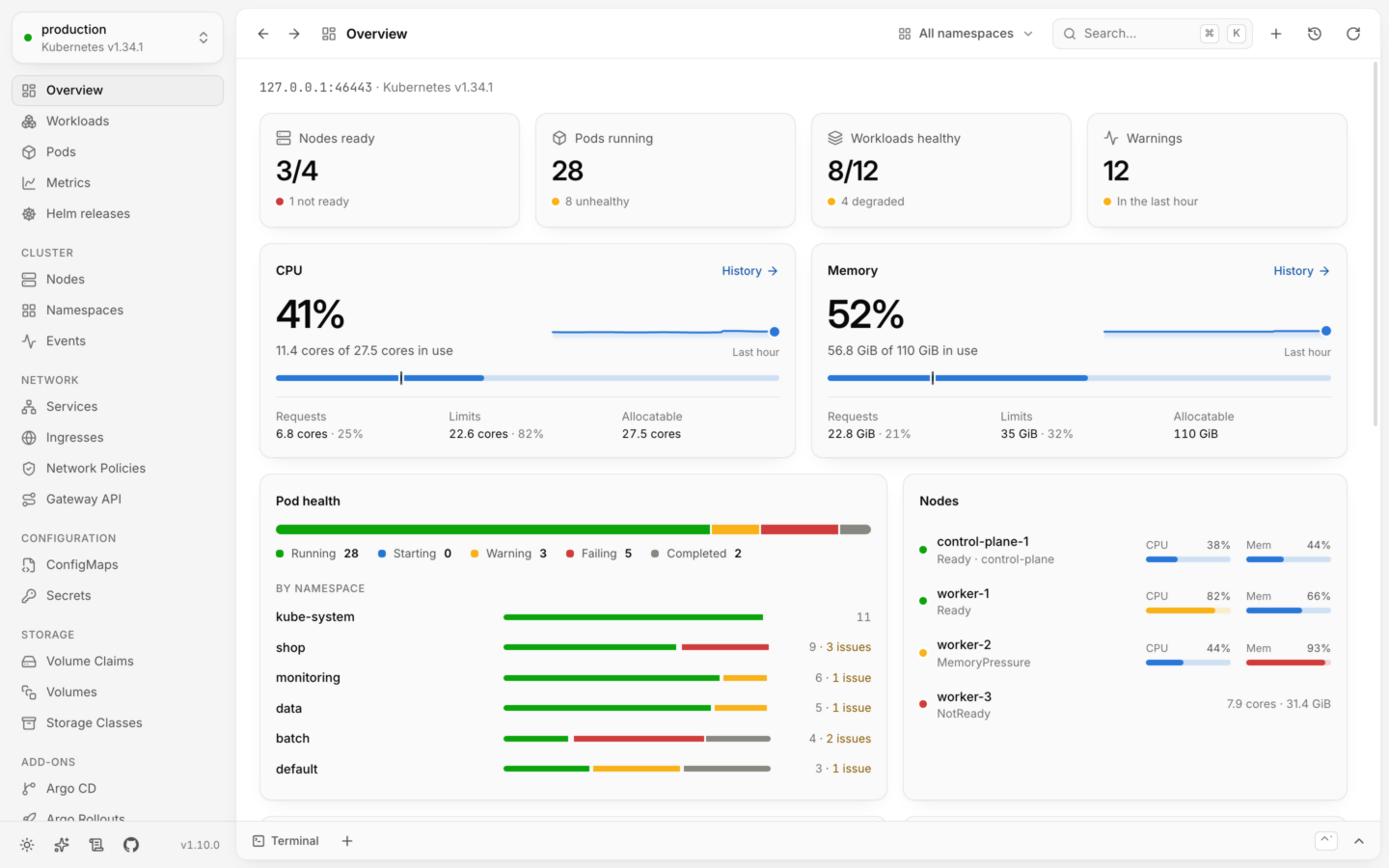
Pod health

  • Running 28
  • Starting 0
  • Warning 3
  • Failing 5
  • Completed 2

Hover a pod. Click a failing one to restart it.Tap a pod. Tap a failing one again to restart it.Everything’s running. Nice work.

Lumovi in a minuteWhat it shows you, where it runs, how AI assistants work through it, and that it’s free and open source.1 min 8 s, with sound.

The tour: every part of Lumovi, in 10 minutes →

Every cluster

All your clusters, in one list. Which answer, how fast, which don’t.

Lumovi reads your kubeconfig and asks each cluster’s API server for its version, so you see which ones answer, how fast, and which don’t. A cluster that signs in through a program, as the clouds’ do, waits until you open it, so nothing opens a browser at launch. Paste a kubeconfig to add a cluster: Lumovi keeps it, and never writes yours. Give each one a name, a color and a group, and switch with ⌘K from anywhere.

Lab2

Shop3

~/.kube/config

Connect your clusters
The app

One calm window for every cluster you have.

Pick a cluster and Lumovi shows you how it’s doing. Problems sort to the top, usage sits next to capacity, and the details are one click away. It follows your system’s light or dark, and every status has an icon and a label, never color alone.

The overview: nodes ready, pods running, CPU and memory against capacity, pod health by namespace, and each node’s usage.The overview: nodes ready, pods running, CPU and memory against capacity, pod health by namespace, and each node’s usage.
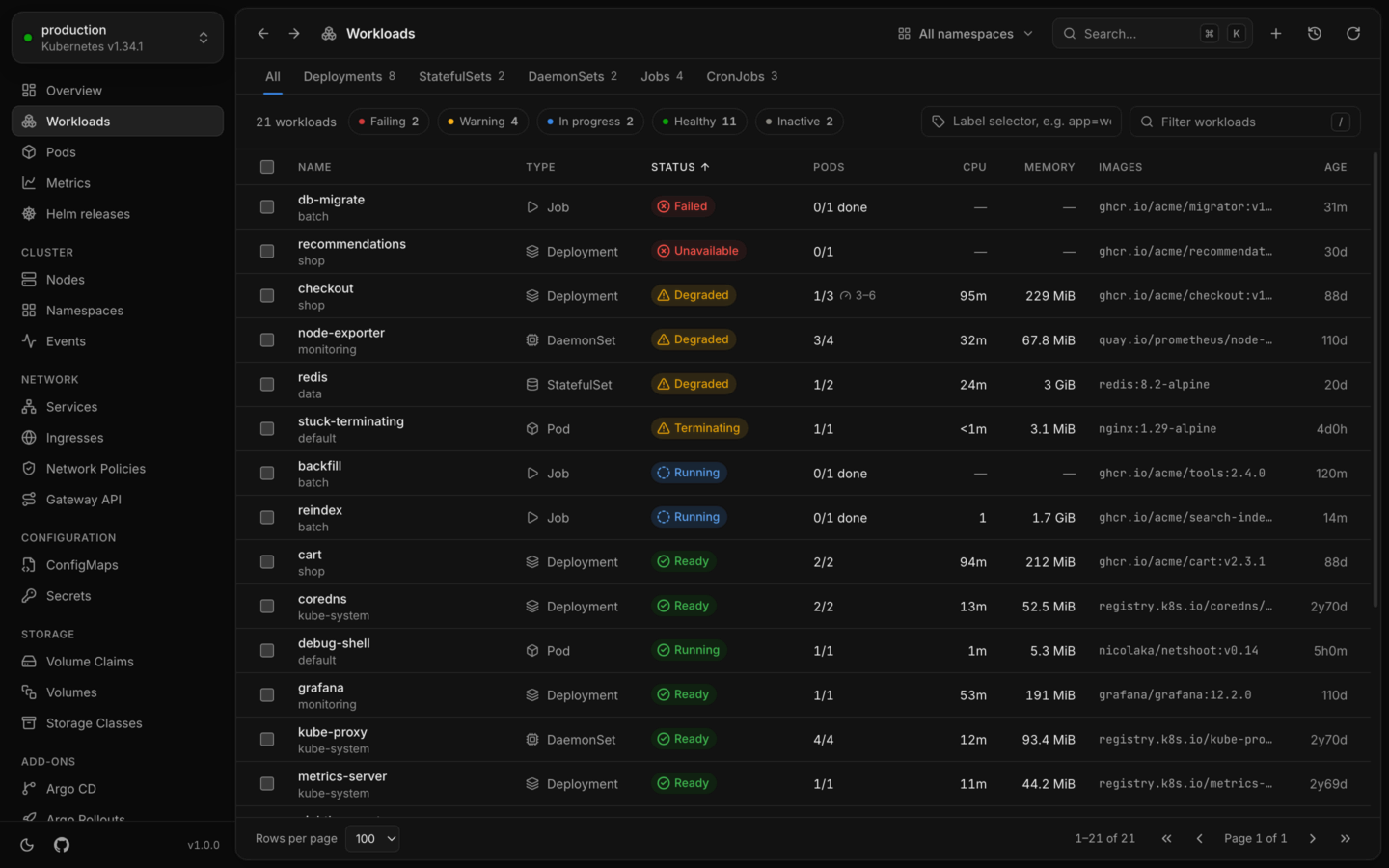
Every workload in one list, sorted with failing and degraded ones first.Every workload in one list, sorted with failing and degraded ones first.
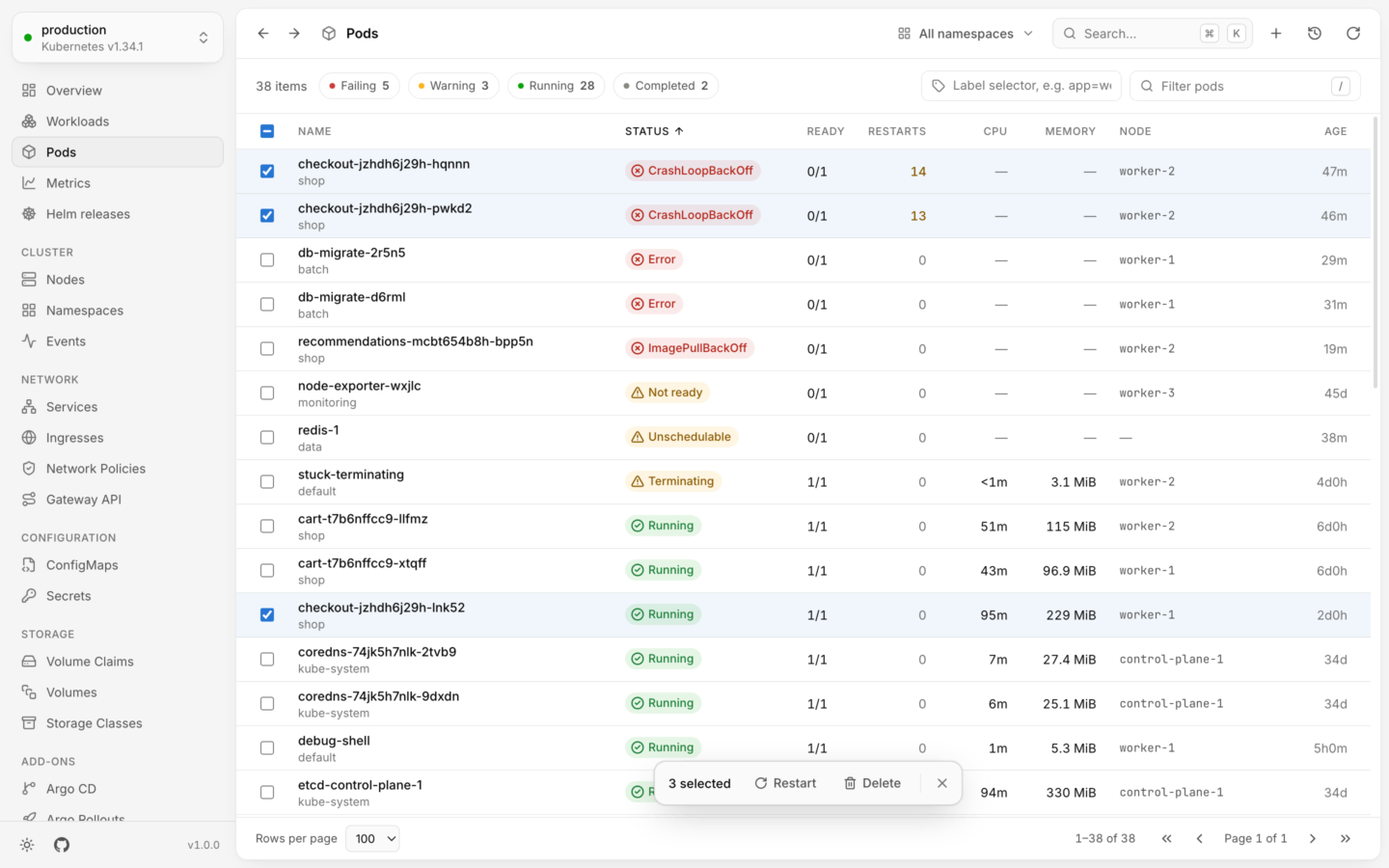
The pods list with three pods selected and a bar to restart or delete them together.The pods list with three pods selected and a bar to restart or delete them together.
CPU by namespace over six hours, with a distribution and a ranked table.CPU by namespace over six hours, with a distribution and a ranked table.
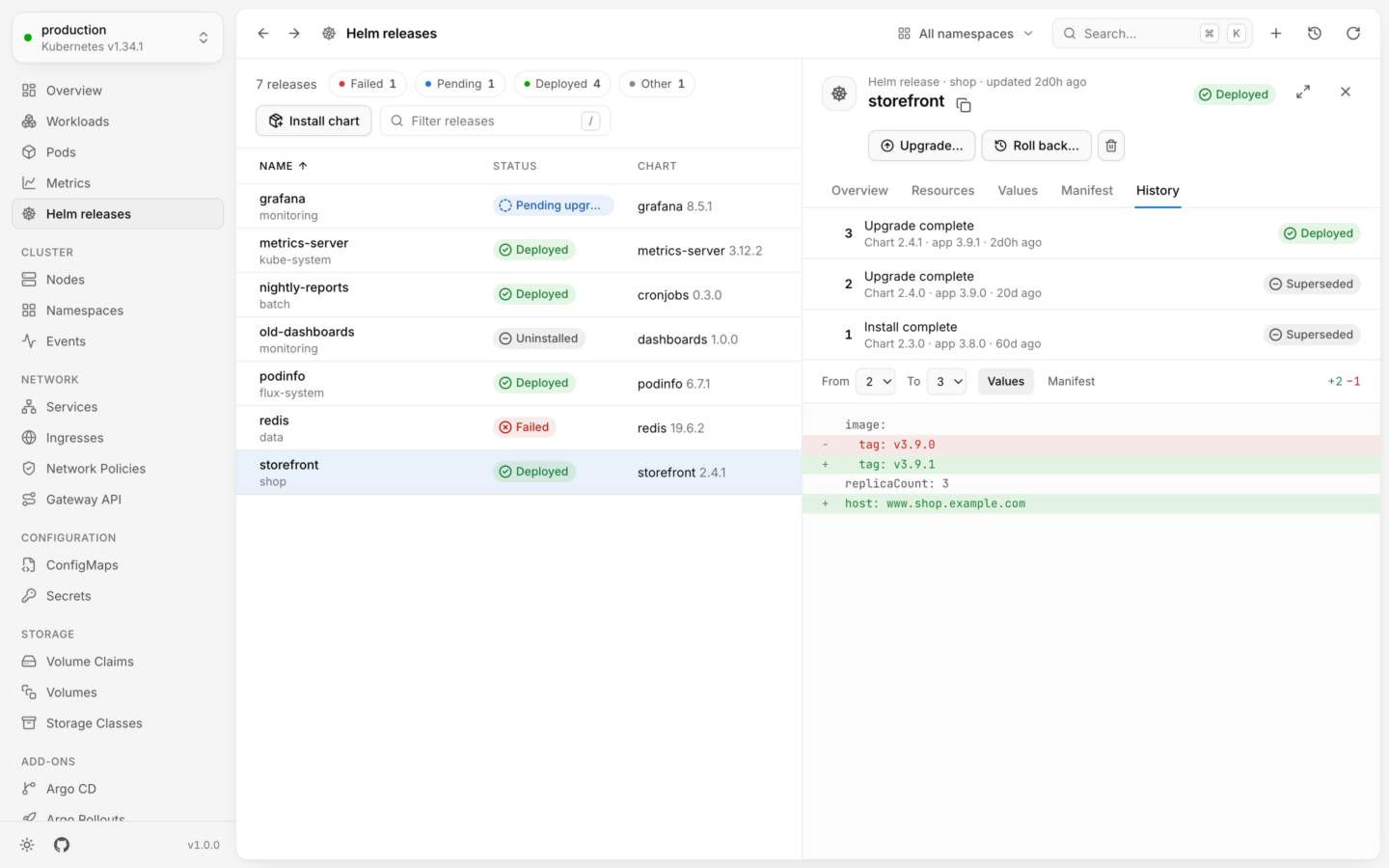
Helm releases, with the storefront release’s history and a diff of its values between revisions.Helm releases, with the storefront release’s history and a diff of its values between revisions.
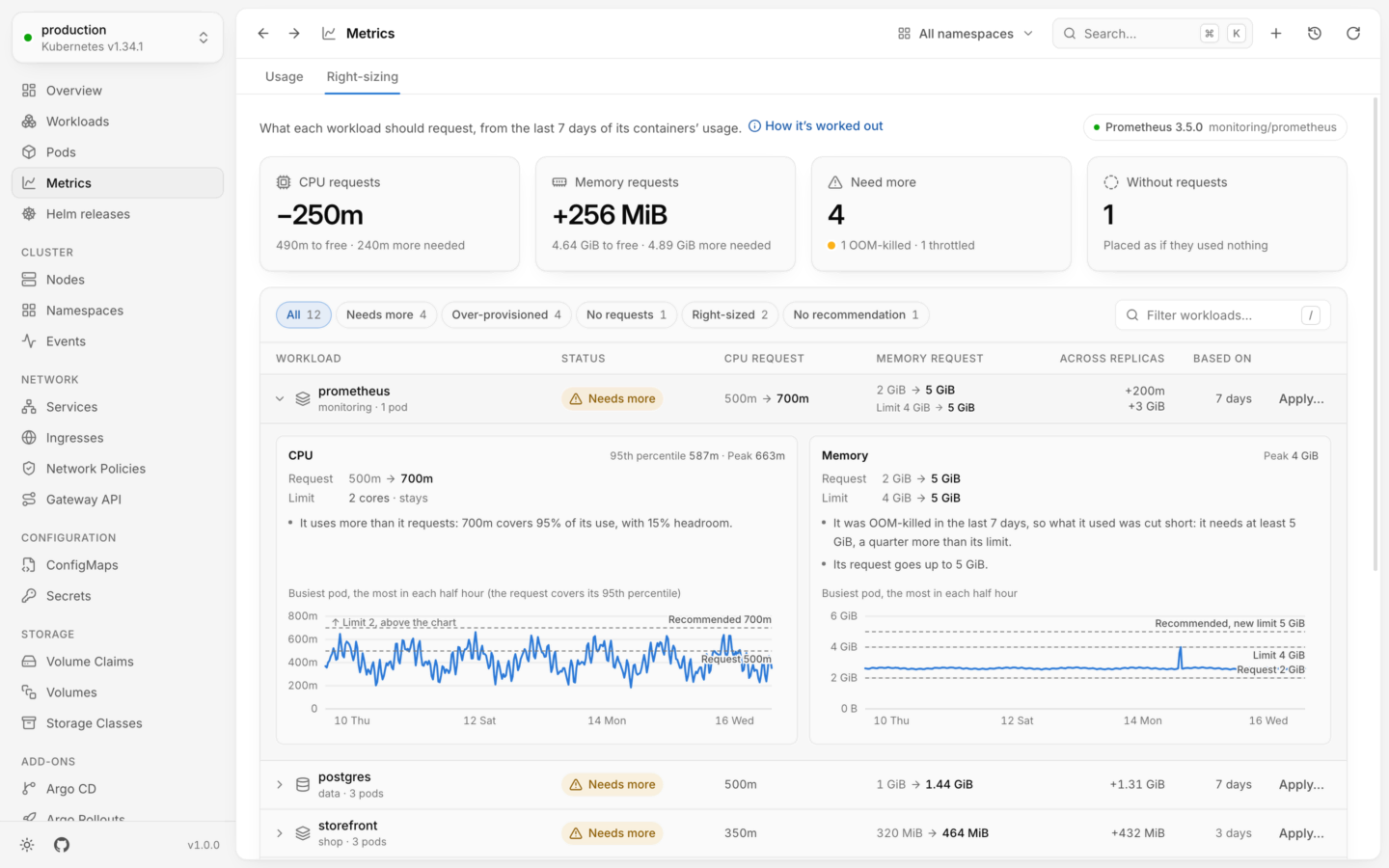
Right-sizing, in Metrics: what each workload should request from a week of its usage. Prometheus needs more memory after it was OOM-killed, with its week charted against its request and limit.Right-sizing, in Metrics: what each workload should request from a week of its usage. Prometheus needs more memory after it was OOM-killed, with its week charted against its request and limit.
Logs from all three pods of the storefront deployment, merged in order with each line marked by its pod.Logs from all three pods of the storefront deployment, merged in order with each line marked by its pod.
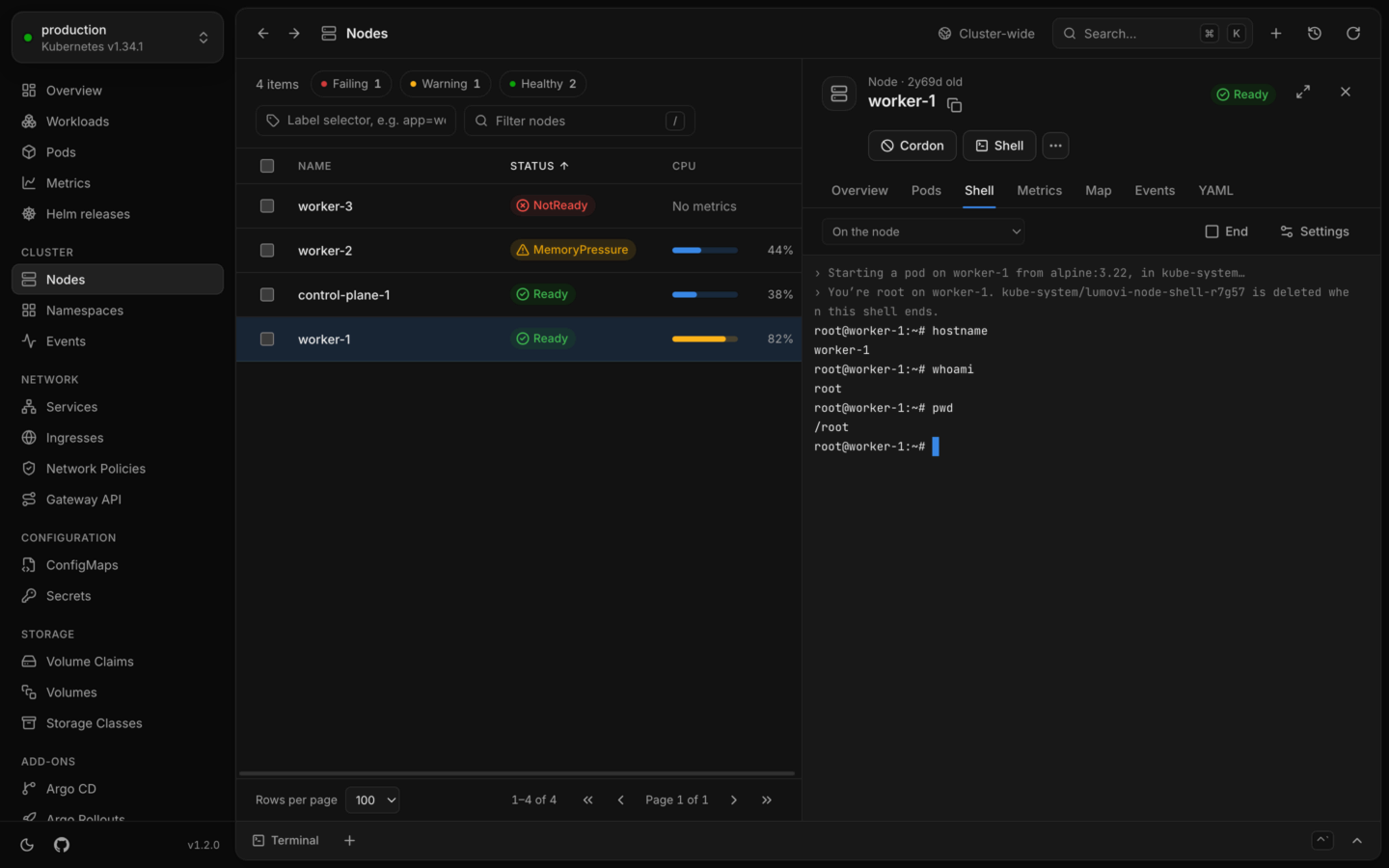
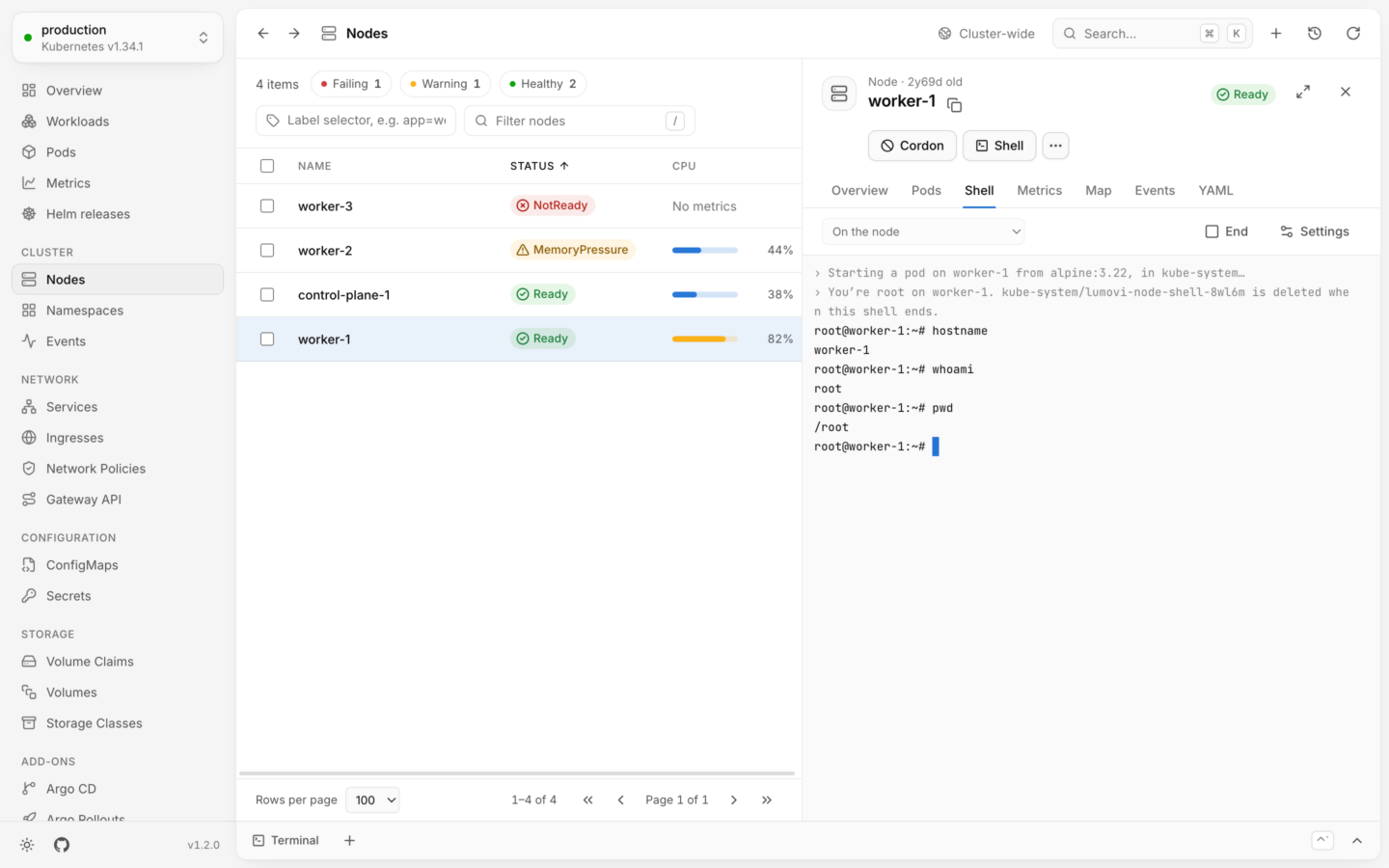
The Nodes page with worker-1’s Shell tab open: root on the node, after Lumovi says which pod it started there and that the pod goes when the shell ends.The Nodes page with worker-1’s Shell tab open: root on the node, after Lumovi says which pod it started there and that the pod goes when the shell ends.
The deployments page with a terminal open along the bottom, running kubectl get deployments in the shop namespace, under Lumovi’s line saying kubectl points at production in this terminal.The deployments page with a terminal open along the bottom, running kubectl get deployments in the shop namespace, under Lumovi’s line saying kubectl points at production in this terminal.
Karpenter’s page: its node pools against their limits, the nodes they launched, one being replaced, and a pod waiting for a node.Karpenter’s page: its node pools against their limits, the nodes they launched, one being replaced, and a pod waiting for a node.

What needs attention, live usage against what’s allocatable, and every node’s load. Overview

Press G then a letter to switch views, just like in the app. Every shortcut

It’s 2 a.m.Checkout fails in the night. Lumovi shows why, and a rollback fixes it.1 min 16 s, with sound and captions.
Map

See what it’s connected to. And what’s missing.

Every object has a map: what leads to it, from the gateway and routes to the services and policies in front of it, and what it uses, from its pods and the ConfigMaps and Secrets they read to the nodes they run on. Point at anything to trace its chain. What’s missing or unwell takes its color, so you see it first.

Deployment · shop · 88d oldstorefront Ready

Above it, what leads to it; below, what it uses.Routes, ownsUses

What stands out

Object details
Change things safely

Every change shows its kubectl. Any revision, one rollback away.

checkout has crash-looped since its last rollout. Roll it back to the revision before, and watch its pods come up one by one. Lumovi checks your permissions first.

Roll back checkout

Deployment · shop · demo

Running now: revision 7

Equivalent command

kubectl rollout undo deployment/checkout --to-revision=6 -n shop --context demo
Changing things safely
Capacity

See where your capacity goes. And why a pod can’t start.

Each node as the scheduler sees it: what its pods request against what it can give, and what they really use. When a pod waits for room, you can see there isn’t any. Right-sizing then says what each workload should request, from a week of its use.

Each node’s room

  • Requested
  • Used
  • Free

worker-2Used 86% · 6.3 GiB of 7.3 GiB

Unschedulableredis-1

Pod · data · 0/4 nodes are available: 1 node(s) were not ready, 3 Insufficient memory.

Live usage
Features

Made for the day something breaks. Calm on all the others.

Problems sort to the top

Every object gets a clear status, and whatever is failing comes first, as the cluster changes. You won’t scroll past 400 healthy pods to find the one that isn’t.

Health and status
  1. db-migratebatchJobFailed0/1 done
  2. recommendationsshopDeploymentUnavailable0/1
  3. checkoutshopDeploymentDegraded1/3
  4. redisdataStatefulSetDegraded1/2
  5. backfillbatchJobIn progress0/1 done
  6. cartshopDeploymentReady2/2
  7. corednskube-systemDeploymentReady2/2
  8. grafanamonitoringDeploymentReady1/1

Helm releases, read in place

Status, values, what it made and every revision, with a diff between any two. Upgrade, or install from Artifact Hub or your computer: a dry run first, then the helm Lumovi brings.

Helm releases
  1. 3Upgrade completeChart 2.4.1 · app 3.9.1 · 2d agoDeployed
  2. 2Upgrade completeChart 2.4.0 · app 3.9.0 · 20d agoSuperseded
  3. 1Install completeChart 2.3.0 · app 3.8.0 · 60d agoSuperseded

⌘K goes anywhere

Jump to any page, object, namespace or cluster. Every page has a shortcut, and what you pin is a key away. Try it.

Finding things

    Logs from every pod, in order

    A workload’s pods merged in the order they wrote, each line marked with its pod. Pods that start later join in. Keep only errors, leave a pod out, search with a regular expression, or read a crashed container’s last run.

    Logs
      AI assistantsDesktop, server and fleet

      Your assistant, with you in charge.

      Lumovi is a Kubernetes dashboard with a built-in MCP server, so any AI assistant or agent that speaks MCP can work in your clusters through it, on your desktop or your team’s Lumovi, as you. You say what they may do, down to the namespace. What they want to change is checked by the cluster, then waits for your answer, with the diff, their reason and the kubectl that does the same.

      AI assistants
      Your assistantlumovi, over MCP
      Your assistant asks

      Scale Deployment storefront to 5 replicas

      Deployment · shop · demo
      Why

      Checkout latency is up 40% since 9:00; storefront pods are at 95% CPU. Two more replicas spread the load.

      The cluster accepts it+1 −1 lines
      Equivalent commandkubectlscaledeployment/storefront--replicas=5-nshop--contextdemo
      Waits 5:00 more
      Approved: checked again, and made.Rejected: nothing changed.Expired: nothing changed.
      Lumovi’s AI assistants page, on Permissions: how many namespaces assistants see, where their changes ask first and where they may read logs or Secret values; the defaults; the rules; and a check of the data namespace, where changes, Secrets and logs are off.Lumovi’s AI assistants page, on Permissions: how many namespaces assistants see, where their changes ask first and where they may read logs or Secret values; the defaults; the rules; and a check of the data namespace, where changes, Secrets and logs are off.
      A rule named Database for the data namespace in every context: no changes, Secrets hidden and logs not read, with a namespace being typed and the namespaces it would match.A rule named Database for the data namespace in every context: no changes, Secrets hidden and logs not read, with a namespace being typed and the namespaces it would match.
      Changes this session: cart scaled to 4 replicas via Claude Code, and a restart of postgres rejected, with the reason given.Changes this session: cart scaled to 4 replicas via Claude Code, and a restart of postgres rejected, with the reason given.

      Defaults for what assistants may do with changes, Secrets, env values and logs, and rules for some clusters and namespaces, the strictest winning. On a server, administrators set limits nobody loosens. What assistants may do

      • Made as you saw it

        Approved, a change is tried again, and made only if it still does what you saw. Deleting needs the name typed wherever Lumovi’s own Delete does.

      • Never more than you

        Your RBAC first, then your rules: a namespace a rule hides isn’t there for assistants, and sensitive env values stay hidden unless you show them.

      • Signed in as you

        On a server, it signs in through Lumovi, as you, with nothing to copy. On the desktop, it has a token kept where only you can read it.

      • Set up in a moment

        On the desktop, a click or a command, whichever your assistant takes. On a server, any MCP client at its address, /mcp.

      It asked firstAn AI assistant fixes checkout through Lumovi, and asks before every change.1 min 26 s, with sound and captions.
      In your cluster

      The same app, for your whole team.

      Install the Helm chart and Lumovi runs in the cluster, as a dashboard your team opens in a browser. Nobody installs anything, and everyone sees and changes only what their own permissions allow.

      Signed in as[email protected]platformon-call
      • Your accessWhat you may do, and why
      • Sign out

      Jane can see and change every namespace.

      • With a token

        auth.mode: token

        People paste a token the cluster accepts, a service account’s or one from your identity provider, and the cluster checks each request made with it. Lumovi’s own service account needs no permissions.

      • With single sign-on

        auth.mode: oidc

        Dex, Keycloak, Okta, Entra ID, Google or GitLab. Lumovi acts as whoever signs in, or passes their own token on when the API server already trusts the provider.

      • Behind a proxy

        auth.mode: proxy

        oauth2-proxy or Pomerium signs people in and names them in a header. The chart’s network policy keeps out everything but the proxy.

      • Every page has an address. Send someone the pod, its logs or the release you’re looking at.

      • Never more than each person’s own RBAC, their shells on nodes and AI assistants too, and readOnly: true keeps everyone from changing anything.

      • A small image for amd64 and arm64 that runs as non-root, has no shell and writes only to /tmp.

      MondayA team opens Lumovi in its cluster: single sign-on, every cluster on one page, who may do what, and the record.1 min 27 s, with sound and captions.
      Fleet

      Every cluster at once. Private ones too.

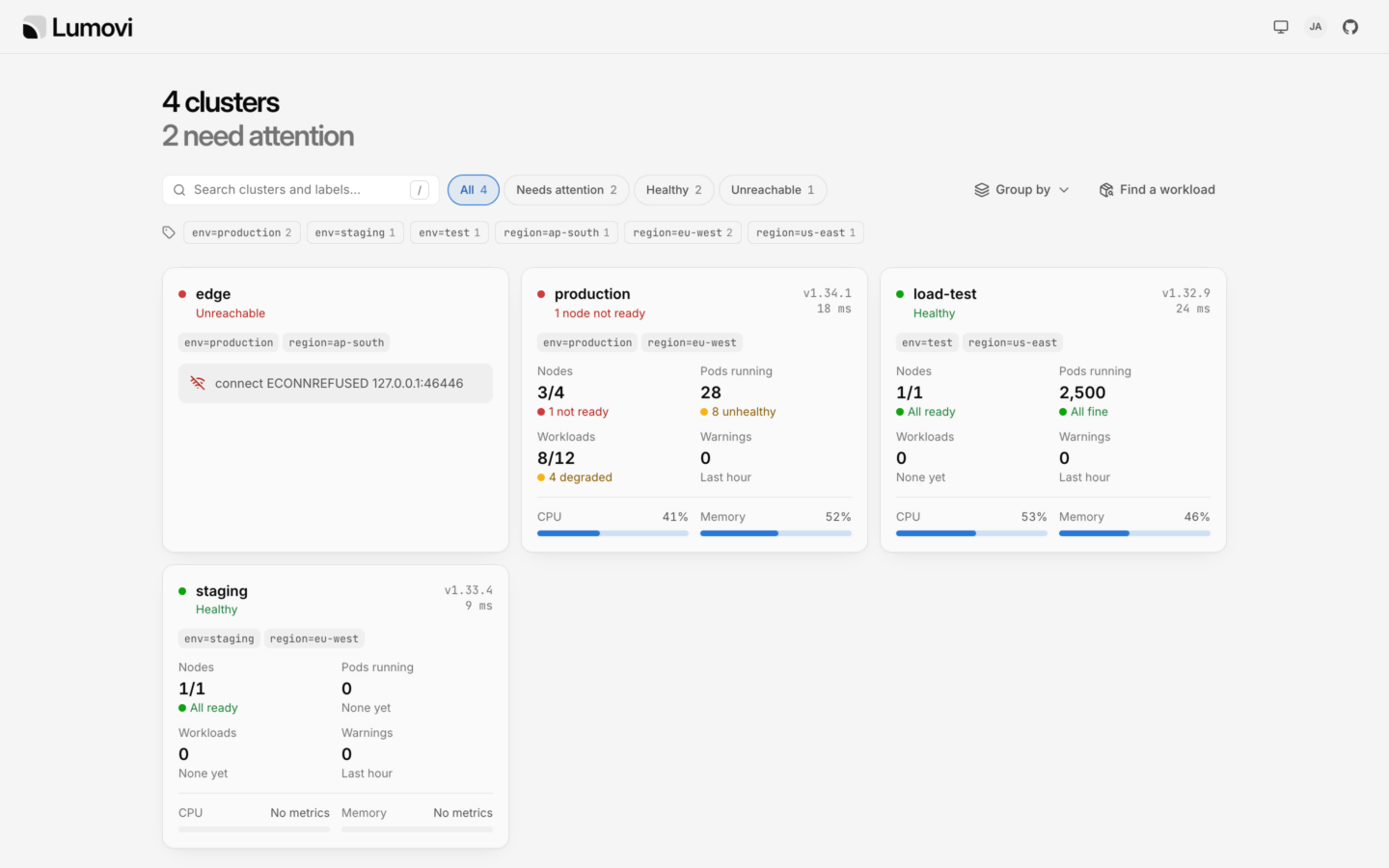
      One Lumovi in a browser for all of your clusters. Each is summed up the way its overview would, what needs attention comes first, and everyone sees each cluster as their own RBAC there allows.

      Lumovi’s fleet: four clusters, two of which need attention, each with its nodes, pods, workloads, warnings, CPU and memory, its version and how fast it answers. One can’t be reached, and says why.Lumovi’s fleet: four clusters, two of which need attention, each with its nodes, pods, workloads, warnings, CPU and memory, its version and how fast it answers. One can’t be reached, and says why.

      Each cluster summed up as its overview would, what needs attention first, and its labels to filter and group by. A fleet of clusters

      • Lumovi acts as whoever signs in, with single sign-on or a proxy, or passes their own token on to clusters that trust your identity provider. Their AI assistants act as them too.

      • An agent in the cluster dials out to Lumovi. Nothing in it listens, no firewall lets anything in, and TLS runs to the API server through it.

      • Clusters found for you

        LUMOVI_FLEET_KUBECONFIG

        From a kubeconfig, or the Secrets Cluster API and Argo CD already keep, with each one’s labels and who may see it.

      • In a cluster with the Helm chart, on a VM, or on a platform like Sevalla from the image, with every setting in its environment.

      Access and auditOn a server

      Who may do what, and who did.

      Admins decide who may do what through Lumovi, team by team: developers change their own namespaces, on-call fixes production, contractors look but don’t touch. Never more than Kubernetes RBAC allows, and everyone can see what they may do, and why. What’s done through Lumovi is recorded: by whom, from where, and how it went.

      Access for your team
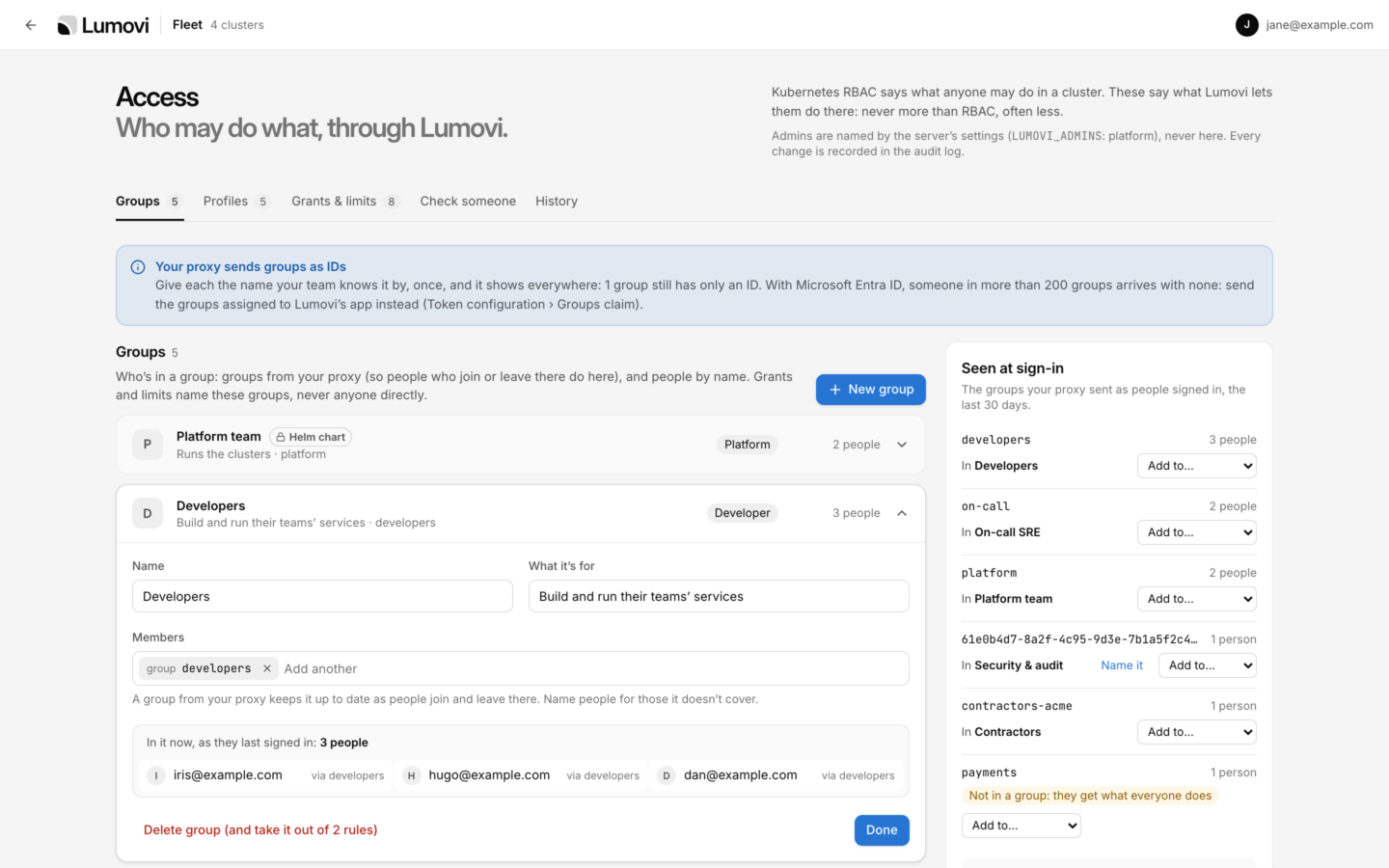
      Lumovi’s Access page, on Groups: the platform team, set in the Helm chart, and Developers, open to show its members: the developers group from the proxy, and the three people in it. Beside them, the groups the proxy sent as people signed in, the last 30 days, each with the Lumovi group it’s in.Lumovi’s Access page, on Groups: the platform team, set in the Helm chart, and Developers, open to show its members: the developers group from the proxy, and the three people in it. Beside them, the groups the proxy sent as people signed in, the last 30 days, each with the Lumovi group it’s in.
      Five profiles side by side, Everyone, Platform, Developer, Operator and Auditor, each with its level of changes, shells, node shells, logs, Secrets, Helm, AI assistants and the audit log. Those that show Secret values, run code on nodes, install charts, let assistants change things unasked or read everyone’s events are marked.Five profiles side by side, Everyone, Platform, Developer, Operator and Auditor, each with its level of changes, shells, node shells, logs, Secrets, Helm, AI assistants and the audit log. Those that show Secret values, run code on nodes, install charts, let assistants change things unasked or read everyone’s events are marked.
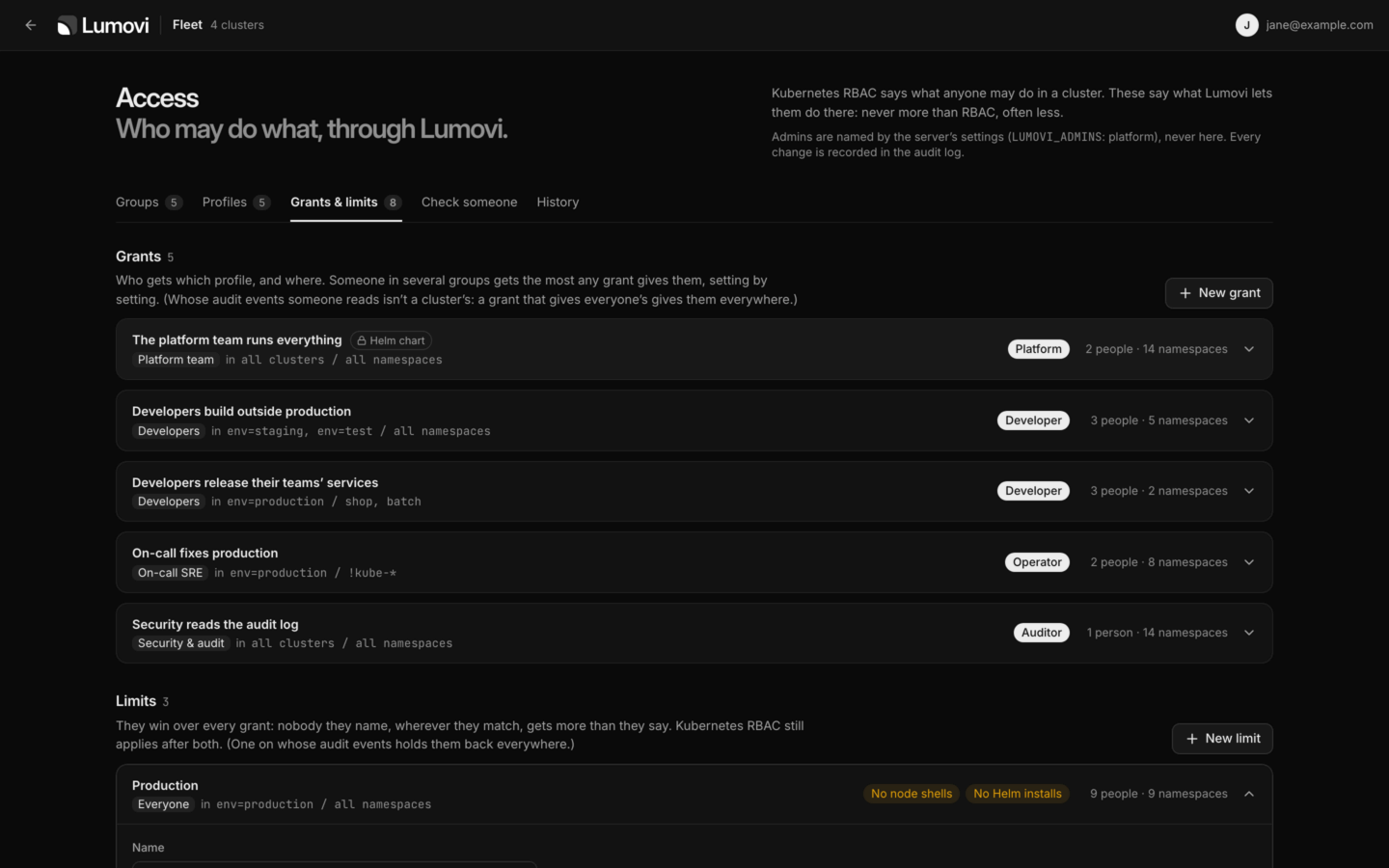
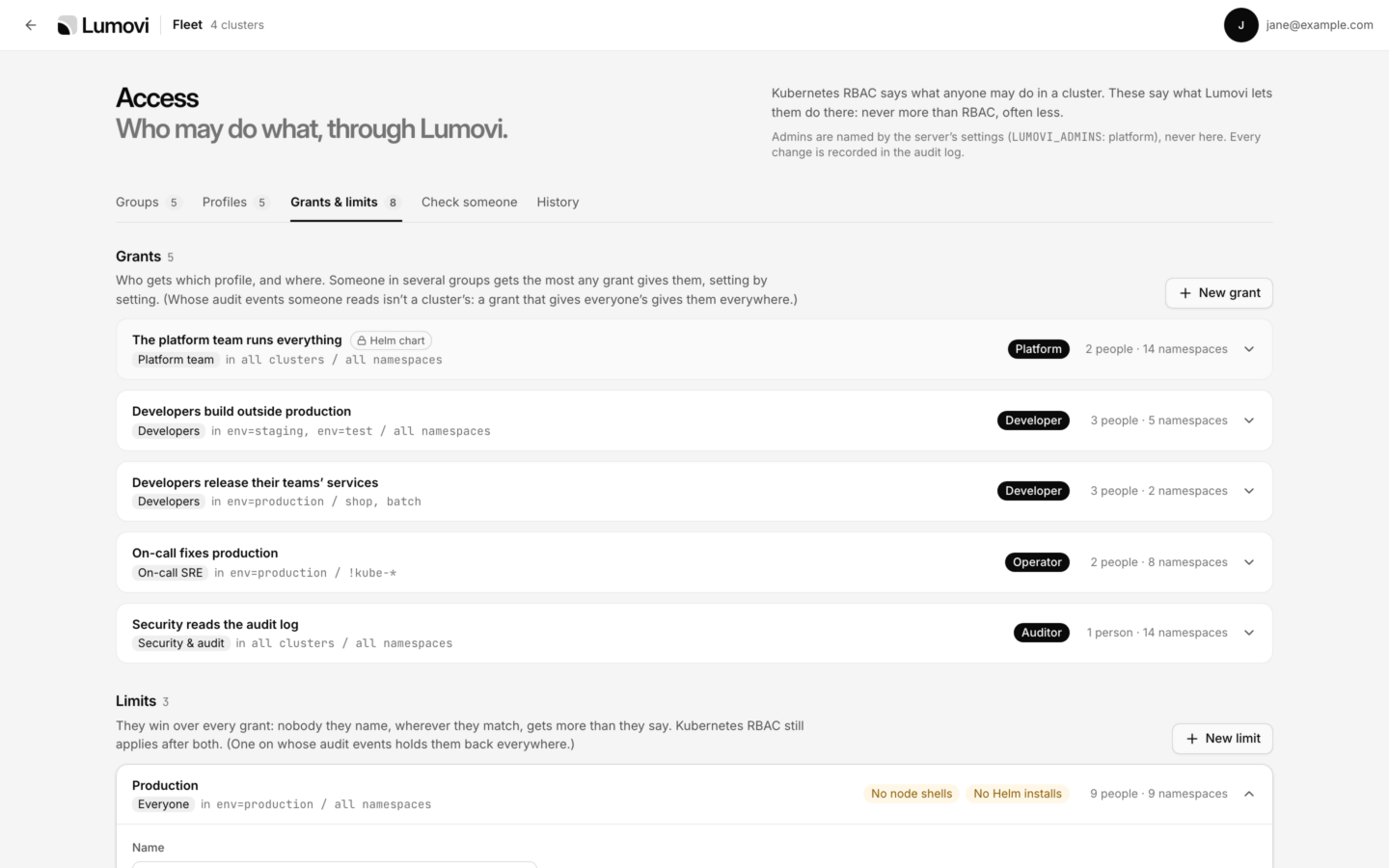
      Five grants, such as the platform team running everything and on-call fixing production, each with its group, its profile, the clusters and namespaces it covers and how many people. Below them, the Production limit: no node shells and no Helm installs, for everyone, in production.Five grants, such as the platform team running everything and on-call fixing production, each with its group, its profile, the clusters and namespaces it covers and how many people. Below them, the Production limit: no node shells and no Helm installs, for everyone, in production.
      Checking dan@example.com, in Developers and On-call SRE, in production’s shop namespace: changes and shells by the developers’ grant, Secret values and AI assistants as they set them by on-call’s, and Helm held to upgrades by the Production limit.Checking dan@example.com, in Developers and On-call SRE, in production’s shop namespace: changes and shells by the developers’ grant, Secret values and AI assistants as they set them by on-call’s, and Helm held to upgrades by the Production limit.
      Your access, for jane@example.com: their groups, and what Lumovi lets them do in each cluster, production, staging, load-test and edge, and where it differs, why. Below, the grants and limits that decide it.Your access, for jane@example.com: their groups, and what Lumovi lets them do in each cluster, production, staging, load-test and edge, and where it differs, why. Below, the grants and limits that decide it.
      The audit log: today’s events, such as a shell opened on a node, logs read through Claude Code, a scale that failed and a delete refused, with search and filters. One is open: a restart Claude Code made as jane@example.com, approved after 18 seconds, with the kubectl that does the same and its place in the log.The audit log: today’s events, such as a shell opened on a node, logs read through Claude Code, a scale that failed and a delete refused, with search and filters. One is open: a restart Claude Code made as jane@example.com, approved after 18 seconds, with the kubectl that does the same and its place in the log.

      Groups from your identity provider, such as Okta, Microsoft Entra ID, Google or Dex, or people by name. Joining or leaving a team there carries over here. Access for your team

      • Admins you name

        LUMOVI_ADMINS

        Groups or people, named in the server’s settings, never on the page. With none, nothing changes: everyone may do what their RBAC allows.

      • The Helm chart can set the admins and the rules, for teams that keep everything in Git. Admins see that part locked.

      • Where your logs go

        LUMOVI_AUDIT_WEBHOOK_URL

        Each event is a JSON line on Lumovi’s output, for your log collector, and can go on to a webhook. Export it as CSV or JSON Lines.

      • Auditors see it all

        LUMOVI_AUDITORS

        Everyone sees their own events, and auditors everyone’s. The desktop app keeps its own, for that computer.

      Custom resources

      Every other kind, too.

      Lumovi finds custom resources through discovery and shows them with the columns kubectl get prints and a status read from their conditions. Plugins add the columns, links and actions that matter for popular projects, and each tool the cluster runs gets a page of its own, with what’s failing first.

      • cert-manager
      • Argo CD
      • Argo Rollouts
      • Flux
      • Gateway API
      • Karpenter
      • KEDA
      • External Secrets
      • Prometheus Operator
      • CloudNativePG
      • Istio
      • Velero
      • Crossplane
      • Your own
      ~/.lumovi/plugins/cert-manager.yaml
      apiVersion: lumovi.dev/v1beta1kind: Pluginmetadata:name: cert-managerspec:version: 1.0.0needs:lumovi: 1.22.0groups: [cert-manager.io]views:- kinds:- { group: cert-manager.io, kind: Certificate }columns:- { name: Hosts, path: '.spec.dnsNames[*]' }- { name: Expires, path: .status.notAfter, type: date }status:- when: { path: '.status.conditions[?(@.type=="Ready")].status', equals: 'True' }health: healthylabel: Readylinks:- name: Secretkind: SecretobjectName: '{{ .spec.secretName }}'

      A plugin of yours is data, and runs no code. The ones Lumovi comes with may also add pages drawn by their own code, in a sealed box: it reads only what its file says it may, and any change it proposes waits for you in Lumovi’s own dialog. What it reads and changes, it does as you. Plugin format

      • Terminals and port forwards

        In the desktop app, your own shell, pointed at the cluster and namespace you’re in, with a kubectl that matches the cluster, and port forwards to pods and services on localhost.

      • Shells, in containers and on nodes

        A shell in any container, or on any node, as root. A debug container brings tools to a pod that has none, distroless included. Each person’s RBAC decides.

      • At home in a company

        Behind its proxy and its own certificate authorities, with a policy IT sets on every computer: clusters read-only, assistants off, updates off, kubeconfig files locked.

      • Hard to do by accident

        Destructive dialogs start on Cancel. Anything in a cluster named like production asks you to type the name first.

      • Read-only when you want it

        Turn changes off for one cluster, or for everyone with LUMOVI_READ_ONLY=1 (readOnly in the chart). Lumovi enforces it, not just the buttons.

      • Works with your kubeconfig

        Multiple files, client certificates, tokens and exec plugins like gke-gcloud-auth-plugin, aws eks get-token and kubelogin. Choose the files in Lumovi, or add a cluster from a pasted kubeconfig.

      • Built for big clusters

        Lists load in chunks of 500 and are paginated and virtualized, so thousands of pods stay smooth.

      • Calm when things go wrong

        A lost connection shows a banner and keeps the last data on screen instead of a blank window.

      • Tested end to end

        More than 95% end-to-end coverage, measured across the desktop app and the server on macOS, Windows and Linux. The chart is installed on a real cluster too.

      Why I built it

      I wanted to open a cluster and know in a second whether it was healthy, and if it wasn’t, where to look first.

      I work on Sevalla. It runs apps, databases and static sites on Kubernetes, and the whole point is that our users never have to think about Kubernetes. They push code, and we look after the clusters.

      That means we watch a lot of clusters. Every day I’d jump between them to check on nodes, pods and capacity. The tools I had were a terminal or a wall of tables. They could tell me anything, just not at a glance.

      I like to see things. A failing pod should look like a failing pod, and a node that’s out of memory should stand out before anyone has to ask. So I built the app I wanted to open every morning.

      Lumovi started as a tool for my own work. It’s free and open source, because anyone who runs a cluster should have one like it.

      Peter

      Sponsors

      Free and open source. Kept bright by its sponsors.

      Lumovi is free, and it stays free. Sponsoring it gives me the time to keep making it better: new views, faster lists, fewer bugs, and all the quiet work behind a good release.

      Sponsor on GitHub
      Sponsors

      Their logos stand here, with a link, for everyone who comes to lumovi.dev.

      • Spark

        $5 a month

        Every bit of light helps. You keep Lumovi free, open and moving forward.

        • The Sponsor badge on your GitHub profile
        • My real thanks
      • Glow

        $25 a month

        For people who open Lumovi every day. Your support turns into new views, faster lists and fewer bugs.

        • The Sponsor badge on your GitHub profile
        • My real thanks
      • Beam

        $100 a month

        For teams who rely on Lumovi to keep an eye on their clusters.

        • Your name and a link in the sponsors section of Lumovi’s README
        • The Sponsor badge on your GitHub profile
      • Lighthouse

        $500 a month

        For companies that run on Kubernetes and want Lumovi to keep shining.

        • Your logo and a link here on lumovi.dev, with Lumovi’s sponsors
        • Your logo and a link in the sponsors section of Lumovi’s README
        • The Sponsor badge on your organization’s GitHub profile

      Rather give once? A one-time thank you of $10 means more than you’d think, and it all goes into the app.

      Rather not run Kubernetes?

      Sevalla keeps the clusters out of your way.

      Push your code and Sevalla builds your app, runs it and scales it on Kubernetes, with its databases next to it. You pay for the resources you use, and you never write a manifest.

      storefront
      Web process · 3 instances
      Latest deployment
      9e2b71dFix the cart total for discount codes
      mainDeployment successful
      Try Sevallalumovi.dev is hosted on Sevalla, and your Lumovi fleet can be too.

      Get Lumovi.

      Free and open source under the Apache 2.0 license, with no telemetry. Download it for your computer, or install it in your cluster for everyone on your team.

      LatestVersion 1.22.1, released October 15, 2026.Release notesSHA-256 checksumsSBOM Verify your download

      On your computer

      It keeps itself up to date. Install the desktop app
      Or build it yourself with Node.js 24 or laterBuild from source
      git clone https://github.com/Lumovi/Lumovi && cd Lumovi && npm ci && npm run dist
      Kubernetes
      1.25 or later
      kubectl
      Not needed
      Helm
      Not needed
      • Helm chart

        Any cluster on Kubernetes 1.25 or later. Then open localhost:8080 and sign in with a token. Upgrading it later signs nobody out.

        Install Lumovi in your cluster
        helm install lumovi oci://ghcr.io/lumovi/charts/lumovi \
          --namespace lumovi --create-namespace
        kubectl port-forward --namespace lumovi service/lumovi 8080:80

        Then give it an address of its own, sign people in with single sign-on, harden it for production, or see every setting. The same chart runs a fleet for many clusters, and an agent in private ones. It’s on Artifact Hub, signed.

      • Container image

        Without Kubernetes, on a machine of its own: Lumovi shows a cluster, or a fleet of them, from a kubeconfig.

        Run it without Kubernetes
        docker run --rm -p 8080:8080 \
          -v "$PWD/kubeconfig:/kubeconfig:ro" -e KUBECONFIG=/kubeconfig \
          ghcr.io/lumovi/lumovi

        For linux/amd64 and arm64. Each release is signed with a build provenance attestation, which you can verify.